
Key Takeaways
- Black box, gray box, and white box describe how much your testers know before they start: nothing, some access, or full access including code.
- For most SaaS products, gray box penetration testing is a strong default, because the biggest risks sit behind the login: roles, permissions, and customer data separation.
- Black box testing is still useful for judging your external attack surface, and white box adds depth when you want code level review, at higher cost and effort.
- What you hand your testers matters as much as the label. Test accounts for each role and for at least two separate tenants make a large difference to what a test can find.
Ask three vendors for a quote and you may hear three different terms for what sounds like the same test. Gray box penetration testing is the one that tends to fit SaaS best, but the right choice depends on what you are trying to learn. Here is what each approach means, and how to pick without overbuying.
What Black Box, Gray Box, and White Box Mean
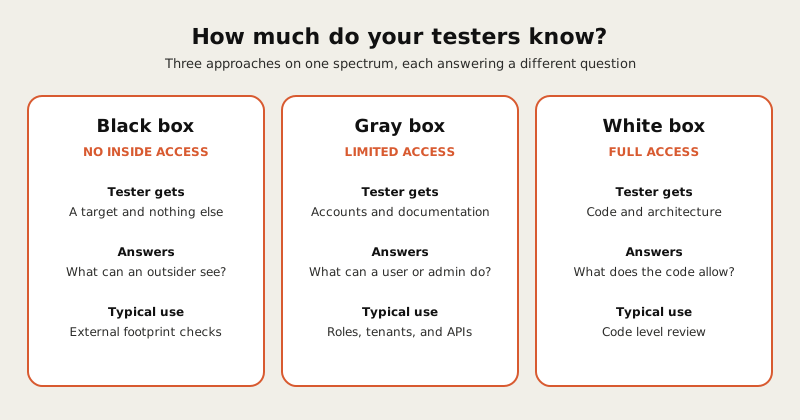
- Black box. The tester starts with no inside knowledge and no accounts, much like an anonymous attacker on the internet. The work focuses on what is visible from outside.
- Gray box. The tester gets limited access, typically test accounts, some documentation, and a description of the product. They can see the application the way a customer, an admin, or a malicious user would.
- White box. The tester gets deep access, often including source code, architecture diagrams, and configuration. This allows code review alongside testing.
The names describe a spectrum, and many vendors blend them. What matters is the specific access you provide and the specific systems in scope, so ask for both in writing.
Why Gray Box Penetration Testing Fits SaaS
A SaaS product is mostly an authenticated experience. Customers log in, belong to an organization, hold a role, and see only their own data. That is where many serious weaknesses live: one customer reaching another customer’s records, a standard user doing what only an admin should, or an API accepting a request it should reject.
Gray box penetration testing puts the tester inside that experience from the first hour. With accounts for each role, they can check whether the boundaries between roles and between customers actually hold. The OWASP Web Security Testing Guide is a widely used reference for what authenticated web application testing covers, including authorization and session handling, which is where most of this work happens.
A black box test can struggle here. Without credentials, a tester may spend much of the engagement on the login page and public surface and never reach the areas where your customer data is exposed.
Trying to work out whether gray box or something else fits your product? Book a scoping call and we will talk through your roles, tenants, and APIs before suggesting a scope.
When Black Box or White Box Makes Sense
Gray box is a default, not a rule.
- Choose black box when the main question is what an outsider can see: exposed services, public endpoints, and anything reachable without logging in. It also suits a quick check of your external footprint.
- Choose white box when you want code level findings, for example before a major release, for a security sensitive component, or when a buyer or auditor asks about code review. It generally takes more time and more of your engineers’ attention.
- Combine approaches when budget allows, such as a gray box application test plus a light external assessment of your public infrastructure.
What to Give Your Testers
The quality of a gray box test depends on the access you provide. A good starter set:
- An account for every role. Standard user, admin, read only, and any partner or support role.
- Two separate tenants. Testing whether one customer can reach another’s data requires two customers to test between.
- API documentation. A specification or collection that lists endpoints and parameters.
- A description of key workflows. Billing, invitations, file uploads, exports, and anything that touches sensitive data.
- A named contact who can answer questions during testing.
If you want a way to judge how deep a vendor will actually test, our pentest vendor evaluation guide lists the questions to ask about hours, methodology, and sample reports.
How We Approach SaaS Testing
For SaaS products we start from the authenticated experience: every role, at least two tenants, and the APIs behind the interface. We then add external or code level work only where your risk or an audit calls for it. The result is a scope built around where your customer data actually sits.
Talk to us to learn more about our SaaS Penetration Testing Service.
FAQ
Is gray box penetration testing better than black box? Not universally, but for SaaS it is usually more useful, because most of the risk sits behind the login. Black box answers a different question about what outsiders can see.
Is white box testing more thorough? It can find issues that testing alone might miss, since testers can read the code. It also takes more time and usually costs more, so it suits specific goals more than a default annual test.
Does my auditor care which type I choose? Auditors generally care that the test was independent, covered the systems in scope, and was documented. Confirm any specific expectations with your auditor, and ask your vendor to state the access level in the report.
How many test accounts do we need? At minimum one for each role, plus a second tenant so testers can try crossing between customers. More roles or more complex permissions may need more.
If you want a test built around your roles, tenants, and APIs, book a scoping call.
Packet33 is a penetration testing and compliance advisory firm serving SaaS and HealthTech startups in the US, Canada, and UK.

Mohamed is the founder of Packet33. He worked as a cybersecurity analyst before launching the firm and now leads an OSCP-certified team serving SaaS and HealthTech startups in the US, Canada, and UK.